Maulidar Font for Web Design: A Modern Script with Friendly Appeal
It was a quiet afternoon when I first placed Maulidar into the hero section of a boutique online store I was redesigning. The moment the font rendered on screen, I knew this wasn’t just another script font—it had a warmth and modernity that felt perfect for the brand’s identity. As a web designer, I’ve tested countless typefaces, but Maulidar stood out with its clean, brush-like strokes and approachable charm.
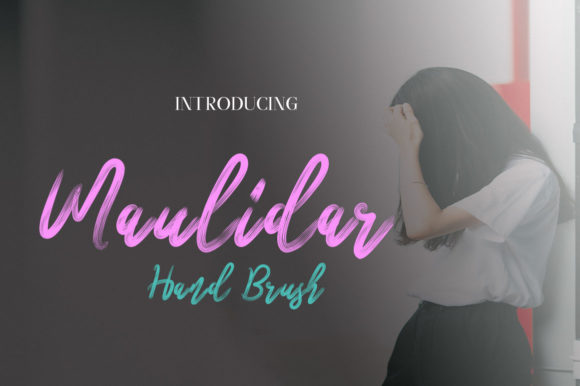
Maulidar is a simple yet lovely brush font from Script Amp, designed to bring a friendly feel to digital spaces. Its soft curves and subtle variation in stroke weight give it a handcrafted appearance, making it ideal for websites that want to convey creativity, authenticity, or a personal touch without feeling overly ornate.
Testing Maulidar in Real Web Layouts
I started by applying Maulidar to the main headline of the hero section. It looked great over a full-screen image of handmade products, where the font’s gentle texture complemented the natural textures of the items in the photo. The contrast between the softness of the font and the sharpness of the background image created a balanced visual hierarchy.
Next, I experimented with using Maulidar in a call-to-action button. While it worked well as a decorative accent, I quickly realized that it might not be the best choice for small buttons or areas with limited space. The brush-like style can sometimes make short phrases appear cluttered if not spaced carefully.
On mobile devices, I noticed that the font remained legible, even at smaller sizes. However, I did adjust the line height slightly to ensure that the characters didn’t run into each other when viewed on narrow screens. This attention to detail helped maintain readability across all device sizes.
Where Maulidar Shines in Digital Projects
Maulidar excels in situations where a touch of personality is needed without overwhelming the design. It works beautifully in website headers, landing page titles, blog headers, and promotional banners. For instance, I used it on a coaching website to create a warm welcome message that immediately set the tone for the brand’s mission.
Another great use for Maulidar is in logo text or site-wide branding elements. Its modern look pairs well with minimalistic layouts, especially when paired with a clean sans serif font for body copy. This combination creates a professional yet inviting aesthetic that resonates with audiences looking for both quality and approachability.
For e-commerce sites, I found that Maulidar adds a unique flair to product banners and promotional sections. It doesn’t distract from the product itself but instead enhances the overall visual appeal of the page. When used sparingly, it becomes a subtle yet effective design element that supports the brand’s identity.
Readability and Practical Considerations
While Maulidar has a friendly and artistic feel, it’s important to consider its suitability for different parts of a website. It shines in display settings—such as headlines, section titles, and decorative accents—but may not be the best choice for long paragraphs of body text. Its decorative nature can make dense blocks of text harder to read, especially for users who prefer clear and straightforward typography.
When pairing Maulidar with other fonts, I recommend using a simple sans serif or serif font for body content. This ensures that the design remains accessible while still allowing the script font to add character to key elements. For example, pairing Maulidar with a clean sans serif like Montserrat or Lato helps maintain a cohesive and professional look across the site.
Additionally, it's essential to check whether Maulidar includes webfont support and multilingual characters before using it on live projects. Since many websites serve global audiences, having access to a wide range of characters and languages is crucial for maintaining accessibility and inclusivity.
Finally, always verify the commercial font licensing terms, especially if you plan to use Maulidar on client projects, online stores, or any public-facing digital assets. Ensuring that you have the right to use the font commercially will help avoid any legal issues down the line.